DSS Agile 81.014.0000000
Publisher Description


DSS Agile 8 APP is a Mobile Client for DSS products above version 8.0.0
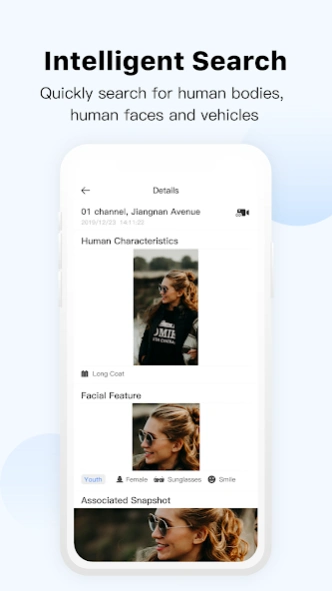
DSS Agile 8 APP is a Mobile Client for DSS products above version 8.0.0, including DSS Professional, DSS Express, DSS7016D/DR-S2, and DSS4004-S2. Based on the application-based design, it is divided into four major applications: monitoring center, event center, intelligent search and access management. It has functions such as live view, video playback, map, alarm push notifications, face detection, visitor passing, etc.
About DSS Agile 8
The company that develops DSS Agile 8 is Hangzhou CE-soft Technology Co., Ltd.. The latest version released by its developer is 1.014.0000000.
To install DSS Agile 8 on your Android device, just click the green Continue To App button above to start the installation process. The app is listed on our website since 2026-08-11 and was downloaded 7 times. We have already checked if the download link is safe, however for your own protection we recommend that you scan the downloaded app with your antivirus. Your antivirus may detect the DSS Agile 8 as malware as malware if the download link to com.mm.dss.agile is broken.
How to install DSS Agile 8 on your Android device:
- Click on the Continue To App button on our website. This will redirect you to Google Play.
- Once the DSS Agile 8 is shown in the Google Play listing of your Android device, you can start its download and installation. Tap on the Install button located below the search bar and to the right of the app icon.
- A pop-up window with the permissions required by DSS Agile 8 will be shown. Click on Accept to continue the process.
- DSS Agile 8 will be downloaded onto your device, displaying a progress. Once the download completes, the installation will start and you'll get a notification after the installation is finished.
Program Details
System requirements
Download information
Pricing
Version History
version 1.014.0000000
posted on 2026-08-11
1. Added support for Indonesian, Romanian, and Malay languages.
2. Upgraded login security rules.
3. Multi-Factor Authentication (MFA) support.
4. Graphical CAPTCHA verification.
5. Playback duration permission control for recorded videos.
6. Export video stream permission control.
7. Custom fields added for visitor management.
8. Events can now be forwarded to user groups.
version 1.013.0000000
posted on 2026-03-13
1. Real-time preview supports radar devices.
2. Message subscription and filtering support three levels of alarm classification.
3. The organizational tree supports business organizations.
4. Vehicle capture supports Sira-certified field search.
5. Visual intercom supports information publishing.
6. The maintenance center supports query of device offline records.
7. Intelligent search supports content search.
version 1.012.0000000
posted on 2025-05-15
1. Adapt the latest release of DSS OneBox (version V8.6.0).
2. Support code scanning login and Easy Linkage mode to login DSS OneBox.
3. Fix some known problems.
version 1.011.0000000
posted on 2025-04-13
1.Add VTH 16 alarm types.
2.Add rule-based permission control.
3.Add permission control for resource sources and views.
4.Optimize configuration and display for record identification.
5.Support for displaying the visual range of points on electronic maps.
6.Include alarm details, medium remarks, and the option to view and copy the alarm scheme.
7.Expand visitor invitation to include permission group selection and time templates permission.
version 1.010.0000002
posted on 2024-12-12
1. Display the map according to the platform map configuration
2. Visitor invitation supports the selection of historical visitors for invitation.
3. Face arming supports deployment from person list add
4. The vehicle database arming supports the deployment and control of new vehicle information
5. Favorites supports the synchronization of platform favorites data and display
version 1.010.0000001
posted on 2024-08-13
version 1.009.0000006
posted on 2024-06-04
1. Fix some issues
2. Add Korean
3. Update Polish
version 1.009.0000003
posted on 2024-01-15
1. View server and device running status on the Maintenance screen.
2. View video resolution during live view and playback.
3. Search for vehicle snapshots by vehicle type.
4. View access control events and status on the access control module.
5. View recognition records of face snapshots.
6. Search for face, human body, and vehicle snapshots based on time range (up to 31 days).
version 1.008.0000002
posted on 2023-11-08
Bug fixes
version 1.008.0000001
posted on 2023-08-18
Optimization function.
